
Is your smartphone acting like it’s possessed? There is nothing more distracting than feeling a phantom buzz in your pocket, only to pull out your screen and find absolutely no notifications. If you are asking “why phone vibrates randomly fix,” you aren’t alone. This annoying “ghost vibration” phenomenon has plagued users for years, but in 2026, we have more advanced tools to diagnose and squash this bug for good.
Whether you are rocking the latest flagship Android or the newest iPhone, random vibrations are usually caused by software glitches, aggressive notification settings, or misbehaving third-party apps. Let’s dive into the step-by-step solutions to restore peace and quiet to your device.
Step 1: The Detective Work – Check Your Notification History
Before you start changing system settings, you need to see if your phone is actually trying to tell you something. Sometimes, a “silent” notification—like an email sync or a background app update—triggers a vibration without showing a banner.
On Android, navigate to Settings > Notifications > Notification history. If this is enabled, you can see exactly which app pinged you recently. If you see an app popping up at the exact moment of the vibration, you’ve found your culprit!

Step 2: Boot into Safe Mode
If your phone is buzzing constantly and you can’t pinpoint the app, it’s time for Safe Mode. This diagnostic state disables all third-party apps, running only the software that came pre-installed on your device.
- For Android: Hold the power button, then long-press the “Power Off” icon on the screen until the “Reboot to safe mode” prompt appears.
- For iPhone: While there isn’t a “Safe Mode” equivalent, you can check your Battery Usage in Settings to see if an app is consuming an abnormal amount of power in the background.
If the vibrations stop in Safe Mode, a third-party app you recently installed is definitely the source of the problem. Simply uninstall your most recent apps one by one until the issue resolves.
Step 3: Tame Your Haptic Feedback Settings
Sometimes the issue isn’t a notification at all—it’s a hardware-software miscommunication. Haptic feedback (the subtle vibration when you type or press buttons) can occasionally glitch.
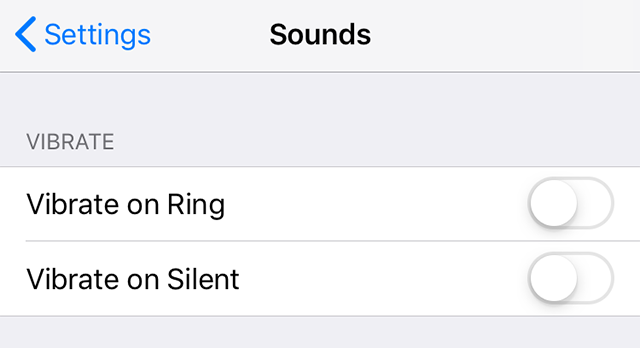
Go to Settings > Sounds & Vibration and try turning off “System Vibration” or “Haptic Feedback” temporarily. If the random buzzing stops, you know the vibration motor is being triggered by a system-level process rather than an incoming alert.
Step 4: The “Universal” Quick Fixes
If software settings aren’t doing the trick, it’s time to go back to basics. These simple steps solve about 80% of random vibration issues in 2026:
- Restart Your Device: It sounds cliché, but a simple reboot clears the cache and stops background processes that might be “stuck” in a vibration loop.
- Update Your Apps: An outdated app may be incompatible with the latest OS version, causing it to crash and trigger a “haptic alert” in the background. Check the Play Store or App Store for pending updates.
- Check Your Charging Cable: Believe it or not, a faulty charger or a loose cable can cause a phone to vibrate as it repeatedly connects and disconnects from a power source.
Step 5: When to Consider a Factory Reset
If you have tried everything and your phone still vibrates for no reason, you might be dealing with a corrupted OS file or a deeper hardware malfunction. Before you head to a repair shop, perform a Factory Reset.
Warning: This will wipe your phone clean! Make sure to back up your photos, contacts, and messages to the cloud before proceeding. If the random vibration persists even after a fresh factory reset, it is highly likely that your phone’s vibration motor is failing or there is a short circuit on the motherboard.
Final Pro-Tips for 2026
- Change Your Pocket: Sometimes, the friction of fabric against your screen can trigger accidental touches or “ghost” inputs. Using a screen protector can minimize this.
- Check for Moisture: If your phone has been exposed to water, the vibration motor might be shorting out. Ensure your charging port and speaker grilles are completely dry.
- Contact Support: If your device is under warranty, don’t try to open it yourself. Reach out to the manufacturer, as they can run remote diagnostics that are much more accurate than manual troubleshooting.
Conclusion
Dealing with a phone that vibrates randomly is a test of patience, but by following these steps, you can eliminate the distraction. Start with the Notification History, move to Safe Mode, and don’t be afraid to perform a Factory Reset if the software is acting up. If all else fails, a professional repair is the best way to ensure your phone stops “ghosting” you and starts working reliably again.